DO NOT MISS
>>Follow our Facebook page for updates! >>Join our Craftwell Design Team: Apply Now!
Showing posts with label embossed. Show all posts

October 10, 2018

Inspirational Tag by Karen Jiles


Hi there,


It's Karen sharing an Inspirational Tag that I created with the Design Grids Embossing Folder. I love the textured pattern in this embossing folder. It lends itself to many possibilities. I began this project by inking a manila tag with various oxide inks. After drying, I embossed the tag using the Cut N Boss machine and the Design Grids Embossing Folder. I then applied vintage photo ink to the tag to enhance the grid pattern. This created the perfect background for the additional embellishments that I used. As shown, I used flowers, beaded pins, clear pebbles and dyed ribbon. I accented and highlighted elements with some gesso. I reinforced the tag with chipboard and it's ready to be used as art décor or gift giving. Loved the end result!


Thanks so much for visiting today...:) 


July 24, 2018

“Dream” Mixed Media Tag by Karen Jiles

Hi there, 

It’s Karen, sharing a Mixed Media Tag that I created with the Cut N Boss Machine and the Design Grid Embossing Folder. I love this versatile folder. It adds just the right amount of texture and the distressed and aged techniques I used created a great vintage effect. I added some book paper to create a fun versatile layer and I enhanced the overall design by tapping on some gesso using a paintbrush.  Take a peek at the super easy tutorial below.
Supplies:

Craftwell Embossing Folder: Design Grid
Inked Manilla Tag
Oxide Inks
Floral Die Cuts
Word Band
Dyed Ribbon
Gesso
Blending Tool
Paintbrush
Trimmer
Scissors

Tutorial:
 
Step 1: Place inked manila tag in the Design Grid embossing folder and run through the Cut N Boss machine. Remove embossed tag from the embossing folder.
Step 2: Using a blending tool, distress the edges of the tag using coordinating oxide inks.
Step 3: Adhere floral die cuts to the tag.

Step 4: Tear a piece of book paper, distress the edges and adhere the book paper onto the tag. Add additional floral die cuts to the tag.
Step 5: Add ribbon and word band to the tag. Highlight ribbon with gesso. Tap gesso over tag using a paintbrush. 
I hope that this "Dream" Mixed Media Tag has inspired you.

Thanks so much for visiting today!
Karen

July 10, 2018

Simply Enjoy the Little Things Instax Album by Karen Jiles

Hi there, 

It’s Karen, sharing a fun little Instax Mini  Album that I created with the Cut N Boss Machine and the So In Love Embossing Folder. I love this folder. It is so versatile and perfect for various occasions. I coupled it with a sweet sentiment: “Simply Enjoy the Little Things”. All that’s needed now are some Instax pics. Take a peek at the super easy tutorial below.
Supplies:
Craftwell Embossing Folder: So In Love
Instax Album
Silver Whitecore Cardstock
Sanding Bar
Black Wired Ribbon
Wooden Word
Scripted Charm
Pearl
Beaded Pin
Trimmer
Scissors

Tutorial: 

Step 1: Place cardstock in Heart embossing folder and run through the Cut N Boss machine. Remove embossed cardstock from the embossing folder.


Step 2: Trim embossed cardstock down to layering size of Instax Album. Sand the embossed cardstock with a sanding bar.
Step 3: Apply adhesive to the embossed cardstock and adhere to Instax Album.
Step 4: Add ribbon and charm to the album.
Step 5: Add wooden word and beaded pin. Continue embellishing as desired.

Thanks so much for stopping by today and I hope that this Instax Mini Album has inspired you!
Karen


May 24, 2018

Embossed Mixed Media Bookmarks

Hello there, friends! Linsey here today sharing my latest Craftwell project--some handmade bookmarks that are super simple and fun to create! These bookmarks are great for book, journal and planner lovers alike! They take very little time to make and are beginner level, which makes them a great craft project for kids too! Take a look....
I used my trusty SNAP Machine along with Teresa Collins 2 pack A6 Embossing Folders, Beautiful Words and Stars and Twill Herringbone to emboss plain white cardstock. Next, I put down a layer of clear gesso on each bookmark and let dry completely. Finally, the fun part....coloring them up! I tried something a bit different and used some Faber-Castell Design Memory Craft Gelatos to add color to each bookmark. There are lots of other color mediums you can choose to use--try inks, sprays, paints--your imagination is the limit!
I like how they all turned out totally different and unique to one another! The embossed texture adds the perfect amount of interest without a lot of bulk. A bulky bookmark is no Bueno! ;)
You can finish with painting a layer of Mod Podge or other protective sealant over the colored bookmarks to ensure no color smearing and a longer life span. These bookmarks add a pop of color and an element of fun to your daily life. I sure hope you've been inspired to create something pretty today! Thanks so much for stopping by an letting me share my project with you! Until next time, happy crafting!

May 22, 2018

Mixed Media Wonderful Friend Card by Karen Jiles


Hi there,          


It’s Karen, sharing this Mixed Media Wonderful Friend Card that I created with the Bella Rose and Honeycomb Embossing Folders, and the Cut N Boss machine. I shared the fun use of the Bella Rose embossing folder with inks on an album cover in a previous post. Today, I’m using some more painted Bella Roses on a card with some mixed media elements.  If you missed the tutorial on how I painted the embossed Bella Roses, please check out the tutorial, here. I coordinated this card with some crinkled ribbon, embossed script, embossing powder and gesso. The Mixed Media Wonderful Friend Card measures 5 ½ x 5 ½. I absolutely love the distressed look of the card. Take a peek at my tutorial below.


Supplies:


Black Cardstock (5 ½ x 11)

Watercolor paper (8 ½ x 11)

Gesso

Watercolor Ink

Aqua Painter

Worded Stamp

White Embossing Powder

Versamark Ink

Ribbon

Scripted Words

Adhesive


Step 1: Place 8 ½ x 11 sheet of watercolor paper into the “Bella Rose” embossing folder. Close the folder and insert into Cut N Boss by Craftwell. Remove the embossed watercolor paper from the Cut N Boss and the embossing folder.


Step 2: Using an Aqua Painter, paint the embossed roses with choice of colors and trim down to layering card size.

Step 3: Emboss sentiment onto black cardstock. Unevenly emboss the edges to give the sentiment a distressed looked. Secure sentiment to card embossed layer with ribbon.

Step 4: Using the Honeycomb embossing folder and Cut N Boss by Craftwell, emboss a 5 ½ x 11 piece of black cardstock.
Step 5: Fold the black cardstock in ½ and emboss the edges. Layer card pieces together with adhesive. Add bow and ribbon.

Step 6: Using a paintbrush, tap gesso over card and highlight ribbon with gesso. Let dry and continue embellishing as desired. 


Thanks so much for stopping by today. I hope that this Mixed Media Wonderful Friend Card has inspired you to paint your embossed roses and incorporate them into your projects.

Karen

April 25, 2018

Painted Bella Rose Album Cover


Hi there,          

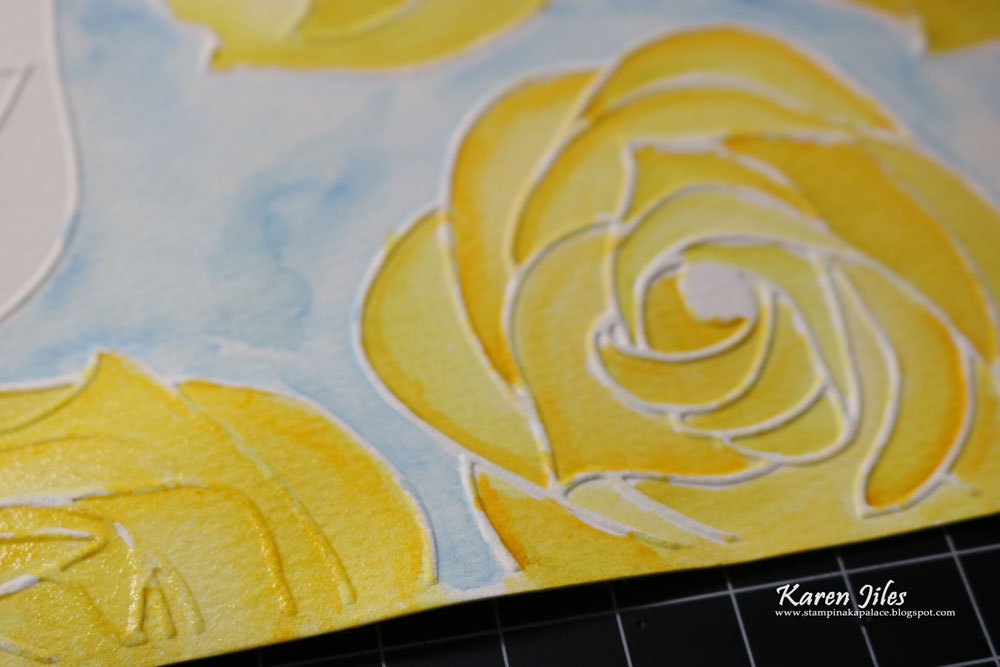
It’s Karen, sharing this little Painted Bella Rose Album Cover created with the Bella Rose Embossing Folder and the Cut N Boss machine. I absolutely loved this project.  Coloring is always therapeutic for me, so when I began this project, I knew that I wanted to dry emboss a full sheet of watercolor paper to work with.  I chose the “Bella Rose” embossing folder because of the full flowers in the pattern. The full flowers are very forgiving when they are painted, and the size of each rose is simply fun. I really loved the end result. I added some crinkled ribbon, scripted words, pearl pins, rose button and gesso. The Painted Bella Rose Album Cover measures 5 ¼ x 6 ½. Take a peek at my tutorial below.


Supplies:
Cut N Boss by Craftwell
Craftwell Embossing Folder and Die Cuts: Bella Rose
Black Album
Watercolor paper (8 ½ x 11)
Gesso
Watercolor Ink
Aqua Painter
Worded Stencil
Pearl Pins
Rose Button
Ribbon
Scissors
Scripted Words

Tutorial: 


Step 1: Emboss full sheet of watercolor paper using the “Bella Rose” embossing folder and Cut N Boss machine.

Step 2: Remove the embossed watercolor paper from the Cut N Boss and the embossing folder.


Step 3: Using an Aqua Painter, paint the embossed roses with choice of watercolor ink colors.


Step 4: Using scissors, cut a section of the painted embossed roses out and add gesso to edges. Set aside.
Step 5: Apply gesso to edges of black album and tap gesso over journal album with a paintbrush.
Step 6: Transfer scripted pattern to gessoed album cover using gesso and stencil. Let dry.
Step 7: Adhere painted watercolor paper to album cover and add ribbon to spine.
Step 8: Add ribbon bow, rose button and pearl pins to album cover.
Step 9: Adhere scripted words to album cover. Continue embellishing as desired.
Thanks so much for stopping by today. I hope that this Painted Bella Rose Album Cover has inspired you to paint your embossed roses and incorporate them into your projects.

Karen

April 10, 2018

"Just Breathe" Journal by Karen Jiles


Hi there,

It’s Karen, sharing this little “Just Breathe” Journal created with the “Bella Rose” Embossing Folder and the Cut N Boss machine. I always enjoy a great journal for each season. This one is perfect. I used a sanding bar to expose the deep embossed impressions of the roses in the folder. The Bella Roses are so full and bold. Absolutely perfect to use with Spring projects. I added flowers, scripted plate, dyed ribbon gesso. The “Just Breathe” Journal measures 3 x 5 ½.  Take a peek at my tutorial below.


Supplies:


Mini Blank Journal

Lilac Whitecore Cardstock

Sanding Bar

Gesso

Flowers

Antique Hat Pin

"Just Breathe" Charm

Dyed Ribbon

Trimmer 

Adhesive


Step 1: Place full 8 1/2 x 11 sheet of whitecore cardstock into the “Bella Rose” embossing folder. Close the folder and insert into Cut N Boss by Craftwell.


Step 2: Remove the embossed cardstock from the Cut N Boss and the embossing folder and trim it down to layering size for your panel. 


Step 3: Adhere cardstock to blank journal and sand the embossed cardstock with sanding bar to expose the whitecore.


Step 4: Add ribbon, flowers and “Just Breathe” charm to journal.  


Step 5: Add additional flowers and ribbon bows. 


Step 6: Add hat pin. Apply gesso to edges of flowers and ribbon.  Tap gesso over journal with a paintbrush. Let Dry. Continue embellish as desired.


Thanks so much for stopping by today and I hope that this little "Just Breathe" journal has inspired you!

Karen


'
 
Copyright © 2014 Craftwell Blog. Designed by OddThemes - Published By Gooyaabi Templates